
Explore software / Salesforce Components / Proposal & Contract Navigator
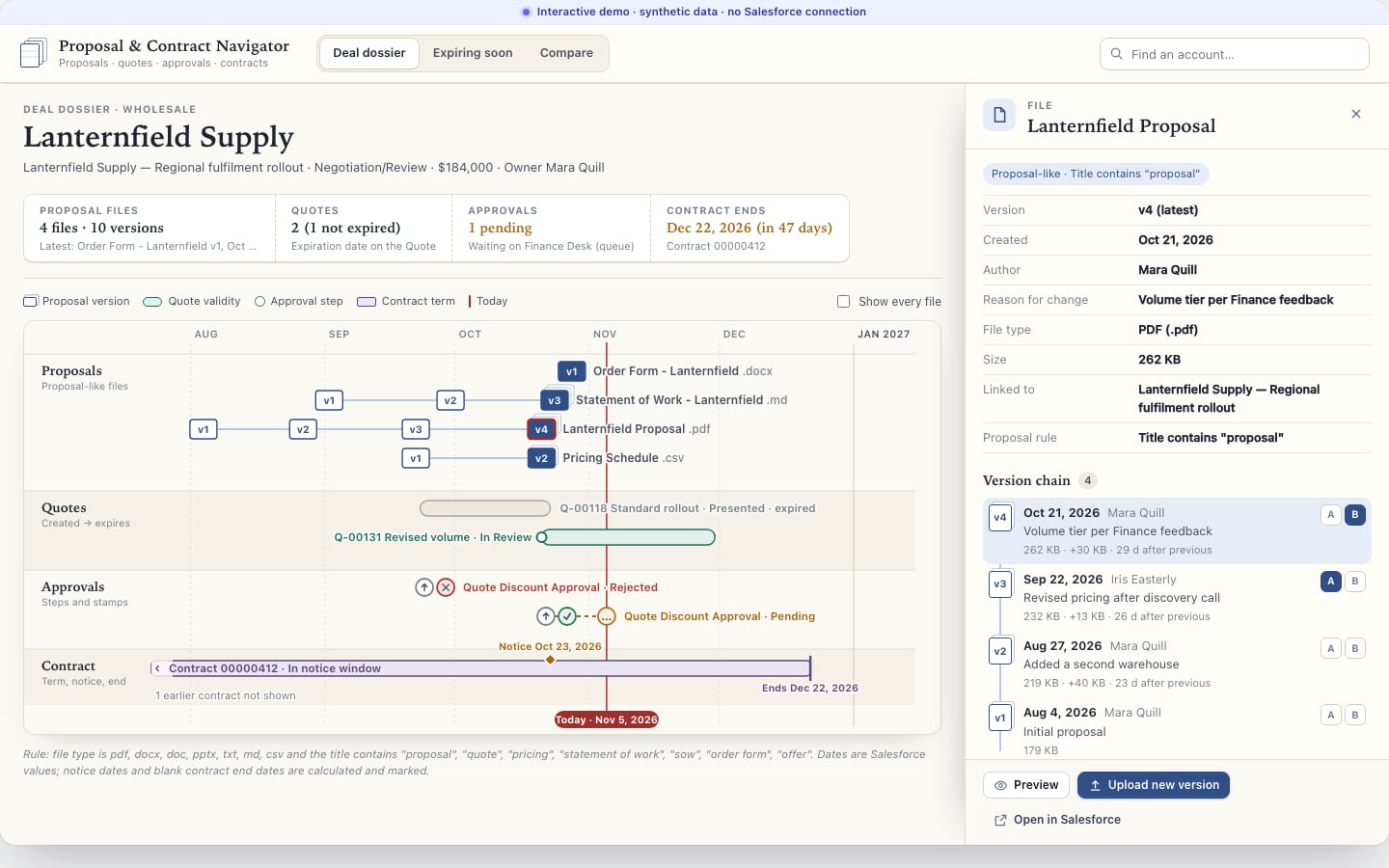
Real screenshots of the interactive demo: the component’s own rules on synthetic Salesforce records (every name is invented).
Salesforce Components · Sales & Pipeline · Operations & Territory Management
Proposal & Contract Navigator
A visual deal dossier for Salesforce: proposal file versions, quotes, approval steps and contract terms on one time river, side by side comparison of what changed, and every contract or quote about to lapse.
A full-width Lightning app on its own tab, and the same dossier on Account, Opportunity, Contract and Quote record pages. The deal dossier lays everything out on one time river with four lanes: Proposals (each Salesforce File linked to the account, deal, quote or contract, one chip per version, shown as a stacked paper chain), Quotes (a bar from creation to expiration, syncing and expired marked), Approvals (every ProcessInstance step as a stamp, with a dashed run to today while it waits) and Contract (the term as a band with the owner expiration notice marker, the end date and a today line). Click anything to open a side dossier: a file's version chain with author, date, reason for change and size; a quote's totals, line count and quote PDFs; an approval's steps, approvers and comments; a contract's dates and field history. Compare shows what changed: two quotes header by header and line by line (added, removed and changed lines with deltas), contract field history, and two file versions by metadata, with a real line diff for .txt, .csv and .md files and an explicit "content comparison not available" for PDF and Word files. Expiring soon is a board across every account you can see: contracts ending, quotes expiring and quiet proposals (no newer version in N days), grouped into lapsed, 30, 60 and 90 days, filtered by owner, status and type, with CSV export. Actions: preview a file, upload a new version, submit a quote or draft contract for approval, set a contract notice reminder task and open any record.
- Lightning Web Component
- Lightning Experience
- Sharing, CRUD and FLS enforced
- Source code included
- Status
- In developmentVersion 1.0.0, built and unit-tested; not yet tested in a Salesforce org.
- Price
- $349 one-timeProposed price, not on sale yet.
- Installation
- Moderate · about 30 minutesSalesforce CLI deployment with a step-by-step guide.
- Delivery
- Download · Salesforce DX sourceDeploy to your own org. Nothing runs outside Salesforce.
- Can I buy it?
- Not yetOpens after testing in a Salesforce org and owner approval.
The problem it solves
The paper trail of a deal is scattered across Salesforce: proposal documents in Files with versions nobody can see at a glance, quotes on the opportunity, approval history in a related list on each record, and contract dates on the Contract. Before a renewal call or a pricing review, someone opens five tabs to answer "which proposal did they get, what changed in the last quote, who is the approval waiting on, and when does the contract end?". Expiring contracts and quotes surface only if someone built the right report. Proposal & Contract Navigator puts that trail on one timeline and lists what is about to lapse across every account.
What it does
- One time river per deal
Proposals, quotes, approvals and the contract term in four lanes on one timeline with a today line, so the whole paper trail of a deal reads left to right.
- Proposal version chains
Every file linked to the account, deal, quote or contract, grouped by document with each version's date, author, reason for change and size. Proposal-like files are picked by a rule you set (title words and file types) and the rule is shown.
- Quote against quote
Two quotes compared header by header and line by line: added, removed and changed products with quantity, price, discount and total deltas.
- No faked diffs
Two versions of a .txt, .csv or .md file get a real line diff. PDF and Word versions are compared by metadata only and say so; their content is never guessed.
- Approval stamps
Every approval step from ProcessInstance with approver, date and comments, the current approver and how many days it has been waiting. Shows "Approvals not visible" if you cannot read approval history.
- Contract term and notice
The term as a band with the owner expiration notice date and the end date. A blank end date is calculated from start date and term and labelled as calculated.
- Expiring soon board
Contracts ending, quotes expiring and quiet proposals across every account you can see, grouped into lapsed, 30, 60 and 90 days, with owner, status and type filters.
- CSV export
Export the filtered expiring list with dates, windows and the rule behind each row; cells are guarded against spreadsheet formula injection.
- Side dossier
Click any version, quote, approval or contract for its facts, version chain, steps or field history, with Open in Salesforce and file preview.
- Upload a new version
Upload with the standard Salesforce uploader and save it as the next version of the same file, with a reason for change, in your own permissions.
- Submit and remind
Submit a quote or draft contract to your active approval process (or see why it cannot be submitted) and create a notice reminder task from a labelled template.
- Degrades gracefully
Quotes, approval history and contract history are checked first; anything your org or your permissions do not allow is hidden with a notice, never shown as empty data.
Compatibility and installation
Built for
- Lightning Experience Its own tab, a Lightning app page or an Account, Opportunity, Contract or Quote record page
- API version 62.0 or later Every org on a current Salesforce release
- Designed for Enterprise, Unlimited, Performance and Developer Editions Editions that allow Apex deployment; not yet verified in an org
- Standard proposal and contract data Files on accounts, opportunities, quotes and contracts; Contracts; optionally Quotes, approval processes and Contract field history
Data it uses
Account, Opportunity, Contract, ContractHistory, ContentDocumentLink, ContentDocument, ContentVersion, Quote, QuoteLineItem, QuoteDocument (when Quotes are enabled), ProcessInstance, ProcessInstanceStep, ProcessInstanceWorkitem, ProcessDefinition and User (read); ContentVersion (create a new version) and the temporary uploaded ContentDocument (delete), Task (create, through Lightning Data Service), and approval submissions through Approval.process
Installation difficulty
Moderate, about 30 minutes. Deploy with the Salesforce CLI using the step-by-step guide, assign the User permission set, then open the tab or add the component to your record pages. No code to write. Check the proposal title patterns and file types in App Builder, and turn on Contract field history if you want contract changes. Or book the installation service.
Not supported or not yet verified
- Salesforce Classic
- Experience Cloud sites
- Salesforce mobile app and tablets (not yet verified)
- Professional and Essentials Editions (no Apex deployment)
- Salesforce CPQ quote objects (SBQQ) and contract-lifecycle products: only the standard Quote and Contract objects are read
- Text inside PDF, Word or PowerPoint files (these compare by metadata only)
Verification pending. The component compiles with the Lightning Web Components compiler and its rules pass 65 unit tests; its Apex tests are written but it has not yet been deployed to a Salesforce org. Each environment will be marked verified only after it is tested there.
What you receive
- The Salesforce DX source: the Proposal & Contract Navigator app and its time river, side dossier, compare, expiring-soon, upload and action components, the rules module, an Apex controller and Apex tests
- The Proposal & Contract Navigator tab and the User permission set
- Deployment and removal manifests
- Installation, configuration, data and calculations, security, performance and org test guides
- Version 1.x updates in My Software
Requirements
- A Salesforce org in Lightning Experience (designed for Enterprise, Unlimited, Performance or Developer Edition)
- A System Administrator, or someone allowed to deploy metadata
- The Salesforce CLI (free) or Visual Studio Code with the Salesforce Extension Pack
- Read access to Accounts, Opportunities, Contracts and Files for every user
- Optional: Quotes enabled, an active approval process on Quote or Contract, and field history tracking on Contract
Changing it later
Settings are Lightning App Builder properties. You receive the source and may change it for your own org.
Limitations
- Not yet deployed or tested in a real Salesforce org; rendering under Lightning Web Security and Lightning Locker, and several Salesforce behaviours listed in the org test plan, are unconfirmed
- Content comparison works only for .txt, .csv and .md files up to 200 KB; PDF, Word, PowerPoint and spreadsheet versions are compared by metadata (date, author, reason, size) only
- "Proposal-like" is a rule on file title words and file type, not document understanding; files with other names need the patterns adjusted
- "Quiet proposal" means no newer file version in N days; Salesforce does not record whether a file was sent, so the app does not claim it was
- Only the standard Quote and Contract objects are read; Salesforce CPQ (SBQQ) quotes and contract-lifecycle products are not supported
- Contract changes appear only for fields with history tracking turned on; approval steps only for people who can read approval history
- Uploads above 4.5 MB cannot be saved as a new version from the app (Apex heap limit) and are kept as a separate file, with a message
- A dossier loads at most 300 files, 2,000 versions, 100 quotes, 100 contracts and 100 approval processes; Expiring soon loads up to 5,000 rows per type. Anything beyond is named, not estimated
- Approve and reject happen in Salesforce's own approval screens; the app shows and submits approvals but does not act on them
- In multi-currency orgs, quote amounts are shown as stored, not converted
- Salesforce mobile app and tablet behaviour not yet verified
Security and data access
- Runs "with sharing": people see only the accounts, deals, files, quotes, contracts and approvals they can already see.
- Every query runs in USER_MODE, so Salesforce enforces object permissions and field-level security; Quotes, approval history and contract history are describe-checked first and hidden with a notice when not available.
- Writes happen only on request and in the person's own permissions: a new file version (ContentVersion insert in user mode, then the temporary upload is removed), an approval submission through Approval.process, and a reminder Task through Lightning Data Service.
- The configured contract lookup field is checked against your org (it must be a readable lookup from Contract to Opportunity), and all values are bind variables: no SOQL injection.
- File text is read only for .txt, .csv and .md files under 200 KB when two versions are compared, and stays in the browser; no callouts, no third-party libraries and nothing is sent to Steadline.
Settings
Every setting is optional and is set in Lightning App Builder.
- Start view
- Deal dossier (default), Expiring soon or Compare
- Expiring window
- 90 days by default (7 to 730)
- Quiet proposal after
- 21 days without a newer version by default
- Proposal title patterns
- proposal, quote, pricing, statement of work, sow, order form, offer
- Proposal file types
- pdf, docx, doc, pptx, txt, md, csv
- Contract to Opportunity lookup
- Optional: your own lookup field on Contract; otherwise Opportunity.ContractId is used
- Height
- Automatic by default, or a fixed height in pixels
Installation and documentation
- 1Unzip and sign in
Unzip the download and sign in to your sandbox with the Salesforce CLI (sf org login web).
- 2Deploy and test
Deploy with the included manifest and run ProposalContractControllerTest: one sf project deploy start command.
- 3Give access
Assign the Proposal & Contract Navigator User permission set to your team. It grants access to the app only, not to records or fields.
- 4Open the tab or add it to pages
Open the Proposal & Contract Navigator tab, or drag the component onto your Account, Opportunity, Contract or Quote record pages in App Builder.
Guides in the download
- Installation Deploy with the Salesforce CLI, run the Apex tests, assign the permission set, add it to a page, and remove it again.
- Configuration Every App Builder setting and what the component does with it.
- Security Sharing, object and field permissions, data read and written, and no external calls.
Optional services
- Installation service We deploy it to your sandbox and production, run the tests and add it to your pages.
- Customization Your own fields, rules or layout, quoted per project.
Quoted per project and not on sale yet. Ask about installation or customization.
Purchase and delivery
- Buy oncePay with Stripe. Steadline never sees your card.
- ConfirmedYour purchase is recorded only after Stripe confirms the payment.
- DownloadThe package appears in My Software with its SHA-256 checksum. Updates to version 1 appear there too.
- DeployFollow the installation guide, sandbox first.
$349 one-time · proposed
Not on sale yet: Built and unit-tested · Apex tests pass in a Salesforce org · Installed from the final package in a clean org · Price and license approved. Purchasing opens when all four are done.
FAQ
Questions before you buy.
Is it a subscription?
No. It is planned as a one-time purchase (proposed price $349). You receive the source code and keep it.
Can I buy it today?
Not yet. It is built and its rules are unit-tested, but it goes on sale only after its Apex tests pass in a Salesforce org, it is installed from the final package in a clean org, and the price and license are approved.
Does it read the text inside our PDFs?
No. For .txt, .csv and .md files under 200 KB it compares the actual text line by line. PDF, Word and PowerPoint versions are compared by their Salesforce metadata (version, date, author, reason for change, size), and the app says that their content comparison is not available. Nothing is guessed.
Which files count as proposals?
Files whose title contains one of your proposal words (by default proposal, quote, pricing, statement of work, SOW, order form, offer) and whose type is in your list. The rule is shown under the timeline and on every file. "Show every file" puts all linked files on the timeline.
Do we need Quotes enabled?
No. With Quotes enabled you get the quote lane, quote PDFs and quote comparison. Without them the app deploys, hides quotes with a notice and shows everything else.
Will people see records they normally cannot?
No. Every query runs with sharing and in user mode, so Salesforce applies each person's sharing, object permissions and field-level security. Approval history, quotes and contract history are hidden with a notice when someone cannot read them.
Does it change our data?
Only when a person asks: uploading a new file version, submitting a record for approval, or creating a notice reminder task. Each runs with that person's permissions. Dates, windows and differences are calculated on the fly and never written back.
How is a contract end or notice date calculated?
The Salesforce EndDate is used when it is there. If it is blank but StartDate and ContractTerm are set, the end is StartDate plus the term in months minus one day (Salesforce's own definition) and is labelled "calculated". The notice date is the end date minus the Owner Expiration Notice days.
How is this different from Account 360 Workspace or Customer Health Command?
Account 360 Workspace summarises an account's contacts, deals, activity and cases; Customer Health Command scores customer health and lays out renewals by health band. Neither shows file versions, quote line differences or approval steps. This app is about the documents and commitments of a deal.
Does any data leave Salesforce?
No. The app makes no callouts and loads nothing from outside Salesforce, and nothing is sent to Steadline.
Has it been tested in Salesforce?
Not yet. The rules and the demo are tested outside Salesforce, and the Apex has been syntax-checked. It is not for sale until it passes the org test plan included in the package.
Does Steadline see our Salesforce data?
No. The component runs inside your org and makes no external calls. The demo on this site uses synthetic data only.
Is there a license key check?
Your license key identifies your purchase for support and updates. The component itself does not check it, does not phone home and has no activation step: it runs entirely inside your Salesforce org.
Do I need another Steadline product?
No. Each component installs and works on its own.
Which editions are supported?
Lightning Experience in Enterprise, Unlimited, Performance and Developer Editions (editions that allow Apex deployment). Classic, Experience Cloud sites and the mobile app are not supported or not yet verified.
Can you install it for us?
Yes, an optional installation service and customization are planned, quoted per project. Ask through the custom request form.
More Salesforce components
-
In developmentFlagshipNew
Pipeline Command Center
Run the whole pipeline from one screen: a drag-and-drop deal board, explainable risk, pipeline movement, a scenario forecast next to your Salesforce forecast, and leaderboards.
$499one-time · proposed, not on sale yet
-
In developmentFlagshipNew
Customer Health Command
Know which customers are healthy, which renewals are at risk and why, with an explainable health score built from the data already in Salesforce.
$499one-time · proposed, not on sale yet
-
In developmentFlagshipNew
Relationship Graph
See who you really know at an account: a live graph of contacts, roles, hierarchy and team, with coverage gaps and activity-based relationship strength.
$299one-time · proposed, not on sale yet
-
In developmentFlagshipNew
Pipeline Galaxy
See the shape of your whole pipeline at once: every open opportunity as a body sized by its amount, gathered into gravity wells, with neglect, risk, concentration and movement you can see at a glance.
$399one-time · proposed, not on sale yet
-
In developmentFlagshipNew
Revenue Journey
See how your revenue actually moved through your sales stages: where it was won, where it leaked, where it is stalled now, and how long it took, rebuilt from Salesforce's own stage history.
$399one-time · proposed, not on sale yet
-
In developmentFlagshipNew
Organization Explorer
See how a customer is structured, who decides and where you have no contacts: an architect-drafted org chart of account families, reporting lines and buying committees, built on the data already in Salesforce.
$299one-time · proposed, not on sale yet
-
In developmentFlagshipNew
Automation Visualizer
See every flow and Apex trigger on every object as one engineering blueprint: what runs before and after the save, where automation piles up, and in what documented order.
$349one-time · proposed, not on sale yet
-
In developmentFlagshipNew
Customer Lifecycle Universe
See where every customer is in its lifecycle, how long it has been there, and how your portfolio has moved, on one living map built from your Salesforce data.
$399one-time · proposed, not on sale yet
-
In developmentFlagshipNew
Deal Intelligence Cockpit
Work your open deals one at a time: see exactly what is wrong with each deal, why, and the next action, then do it without leaving the screen.
$349one-time · proposed, not on sale yet
-
In developmentFlagshipNew
Data Integrity Command Center
Define data hygiene rules across Accounts, Contacts, Leads, Opportunities, Cases and your own objects, see every violation, preview bulk fixes and apply them with an audit trail and undo.
$399one-time · proposed, not on sale yet
-
In developmentFlagshipNew
Forecast Simulator
Build what-if forecast scenarios on your real open pipeline by drag and drop, save and compare them side by side, without ever changing a Salesforce opportunity.
$299one-time · proposed, not on sale yet
-
In developmentFlagshipNew
Smart Record Builder
Create an account, its contact and first opportunity in one guided flow, with duplicates caught before anything is saved.
$249one-time · proposed, not on sale yet
-
In developmentFlagshipNew
Follow-Up Autopilot
Know who to follow up with today and do it in one flow: a rule-built queue, a template email with real merge values, and the next touch scheduled when you confirm.
$249one-time · proposed, not on sale yet
-
In developmentFlagshipNew
Account Briefing Room
Walk into every customer meeting prepared: a printable brief built only from Salesforce data, with what changed since you last met, what is open, who is in the room and an agenda.
$299one-time · proposed, not on sale yet
-
In developmentFlagshipNew
Stakeholder Navigator
See who decides this deal, where each person stands and which seats of the buying committee are still empty, with a fix for every gap.
$299one-time · proposed, not on sale yet
-
In developmentFlagshipNew
Territory Architect
Design territories on a map, see how balanced they are from your real Salesforce data, simulate moves, and apply the ownership changes with a preview, an audit trail and undo.
$499one-time · proposed, not on sale yet
-
In developmentFlagshipNew
Bottleneck X-Ray
See where cases, leads and other records actually wait: time in each status against your targets, loops, who holds the work and SLA breaches, from the status history Salesforce already records.
$349one-time · proposed, not on sale yet
-
In developmentFlagshipNew
Account Atlas
See every account on a map, with pipeline, engagement and territory at a glance, and open any account's full picture in one click.
$399one-time · proposed, not on sale yet
-
In developmentFlagship
Pipeline Hygiene Monitor
Find past-due, stale and incomplete opportunities before they distort your forecast.
$199one-time · proposed, not on sale yet
-
In development
Advanced Data Table
Search, filter, edit and export the records of any object, right on the page.
$99one-time · proposed, not on sale yet
-
In development
Sales Activity Tracker
Keep follow-ups on track and spot accounts going quiet, with one-click actions.
$149one-time · proposed, not on sale yet
-
In developmentNew
Account 360 Workspace
See an account's contacts, deals, activity, cases and health in one workspace before every call.
$199one-time · proposed, not on sale yet
-
In developmentNew
Opportunity Kanban Pro
Move deals through the right stages for each sales process, with confirmed moves, totals and stale flags.
$99one-time · proposed, not on sale yet
-
In developmentNew
Duplicate Record Finder
Find the duplicate Accounts and Contacts already in your org, see why they match, and review them as a team.
$149one-time · proposed, not on sale yet
-
In developmentNew
Task Command Center
Get through your Salesforce task list faster: views, filters, inline edits and bulk complete in one workspace.
$99one-time · proposed, not on sale yet
-
In developmentNew
Record Timeline
See every task, meeting, email and field change on a record in one timeline.
$79one-time · proposed, not on sale yet


Salesforce, Lightning and related marks are trademarks of Salesforce, Inc. Steadline is independent: its components are built by Steadline and are not made, sponsored or endorsed by Salesforce.