
Explore software / Project Management / Project Tracker
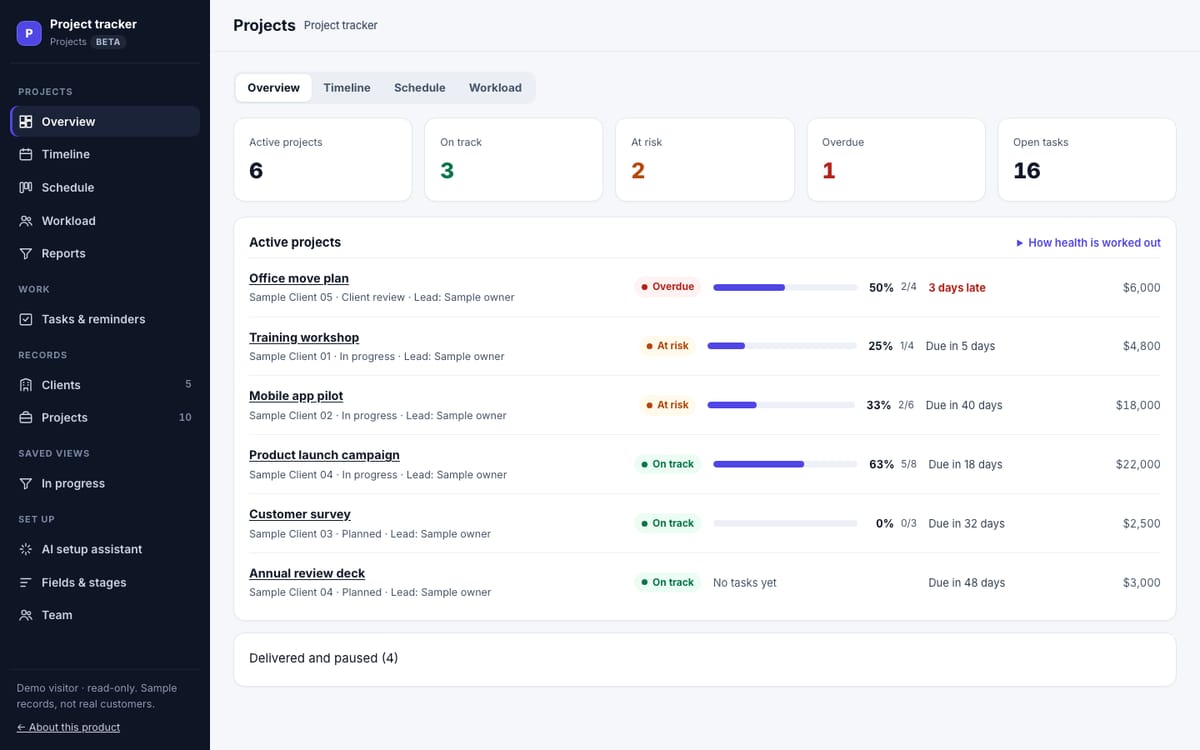
Real screenshots of the working software with clearly labelled sample records.
Project Management
Project Tracker
Client projects with progress, deadlines and each person's workload.
A hosted project workspace for client work: an overview with progress from tasks and health from dates, a timeline, a schedule of open tasks and workload by person. A second workflow template runs a hiring pipeline.
- Status
- Beta
- Delivery
- Hosted web appRuns in any modern browser; your team signs in to one shared workspace.
- Price
- Not sold yetThe beta opens to the public soon; it will be free during the beta, with published limits.
- Preview
- Live demo with sample records
- Can I buy it?
- Not yetThe beta opens to the public soon. The live demos are open today.
What it does
- Overview
Every project with its progress (from its tasks) and health (from its dates).
- Timeline
Each project from start date to due date.
- Schedule
Open tasks by due date, with in-app reminders.
- Workload and roles
Each person's open work; team roles and invitations.
Starting setups
Both setups are the same Project Tracker. Pick the one closest to your work when you start; you can rename records, fields and stages afterwards.
- Project trackerProgress, deadlines and workload across your projects.RecordsClients, ProjectsProjects stagesPlanned → In progress → Client review → Delivered → On hold
- Hiring pipelineCandidates from application to offer.RecordsOpen roles, CandidatesCandidates stagesApplied → Screening → Interview → Offer → Hired → Not selected
What is included
- A hosted project workspace once the beta opens to the public
- The workflow template you choose
- Team invitations with roles
- CSV and JSON export of every record
Add-ons
No add-ons: everything above is included. Integrations are not available yet, so they are never charged.
Changing it later
Inside the app, an optional assistant can propose fields, stages or dashboard cards; you confirm every change. Customizing is optional and never part of buying.
Requirements
- Any modern browser; the timeline is easiest on a larger screen
- A Steadline account
Limitations
- No time tracking, task dependencies, subtasks or file sharing
- Each task has one assignee and a due date
- Clients do not sign in
- Hiring: no job-board posting, résumé parsing or candidate emails
AI answers about Steadline software only, from the catalog on this site. It can make mistakes; product pages are authoritative. It cannot buy, reserve or sign you up.